Markup syntax

Quick start

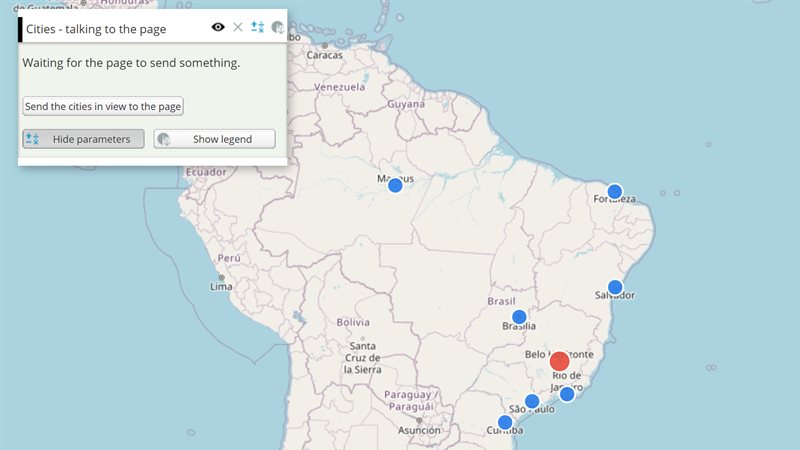
The example below, running in the Mappia calculator - click it to run it live. Full-size picture

  1. Run it

    Click the picture: the map opens right here and runs the example. Nothing is saved, and nothing to install.

  2. Try it
    • Read the panel: plain HTML, a label with an = sign, a number field and a list sit together.
    • Type letters into “A number”: the field is marked invalid, because isnumeric=true accepts only numbers.
    • Open “From a JSON list”: its choices, First and Second, come from the JSON written in data.
  3. Make it yours

    Copy the query, change it - the key parameters are below - and run it again in the playground, or paste it into the Mappia editor to save it as your map.

Key parameters

ParameterExampleWhat it does
defaultParsingvalue=42A number becomes a number; anything else stays text, so param=true is the text “true”.
falseValuenotify=falseBecomes an empty, false value: the way to switch off a parameter that is on by default.
escapedEqualsurl=https://example.com/data.csv?v\=2Puts a literal = in a value. Inside a JavaScript string, write it \\=.
htmlhtml=A label with <i>raw HTML</i> and a = signTaken as written up to the next |: equals signs and HTML need no escaping.
getidgetid=yearRefers to an element created earlier in the same description, for example to listen to its events.
content<b>Plain HTML</b> sits next to the widgets.<br>Everything outside the double braces is passed through as HTML, so headings and containers mix with widgets.

Every parameter, with its type and default, is in the reference at the end of this page.

Complete example

The query 17 lines · runs as is
// Markup syntax: plain HTML around widgets; numbers become numbers, JSON lists are parsed,
// html= is taken verbatim (no escaping needed), and param=false switches a flag off.
[
  {
    title: "Markup syntax",
    name: "CSR:estados",
    source: "calculate",
    opacity: 0.6,
    visibility: true,
    paramsButtonConfig: [{ type: "query", pressed: true }],
    descriptionHtml:
      "<b>Plain HTML</b> sits next to the widgets.<br>" +
      "{{label|html=A label with <i>raw HTML</i> and a = sign, no escaping}}" +
      "{{textfield|id=amount|fieldLabel=A number|value=42|isnumeric=true}}" +
      '{{combobox|id=choice|fieldLabel=From a JSON list|editable=false|data=[["First"],["Second"]]}}',
  },
];

Customize it

The shape of a tag

{{widgetName|param=value|other=value}}

The tag name comes first, then parameters separated by |. An unknown tag name renders nothing; the browser console shows {{MARKUP}} INVALID OBJECT NAME. The tag names are listed in the widget catalogue.

Values

You writeThe widget receives
value=42The number 42
text=HelloThe text "Hello"
pressed=trueThe text "true", which counts as on
notify=falseAn empty value, which counts as off
param= or a bare paramAn empty value (a bare isnumeric is the exception: it switches the check on)
data=[["First"],["Second"]]Text the widget reads as JSON (lists such as data, steps, values)
a=b=cA nested object, { a: { b: "c" } } - plugins=tip={0}% gives a slider its value tip this way

A combobox’s data is a list of one-element lists: each value is both what the list shows and what the input holds. A second element in a pair is ignored.

Escaping

  • \= puts a literal = inside a value, which URLs with query strings need. The markup is usually written inside a JavaScript string, where the backslash itself must be doubled: "{{loadcsv|id=tbl|url=/data/fires.csv?year\\=2020}}".
  • html= is the exception: its value is taken as written up to the next |, so HTML and = signs need no escaping.
  • The | always separates parameters, inside html= too.

Repeated parameters

The last one wins, except cls, whose values are joined with no separator - start the second one with a space, or list all the classes in one cls.

Callbacks

Parameters such as handler=, runOnClick= and onSelect= name a function. The name is looked up first in the layer’s functions, then among the query’s globals; failing both, the text itself is run as the function’s body. Prefer functions on the layer:

descriptionHtml: "{{button|id=apply|text=Apply|handler=onApply}}",
functions: {
  onApply: function () {
    ExtjsUtils.ALERTIFY.log("Applied");   // this = the layer
  },
},

Referring to other elements

getid=ID points to an element created earlier in the same description, and getid=ID|getid=on_<event>=<code> attaches a listener to it. Order matters: the element must come first. The complete rules are in the widget markup language.
Real maps that use it

AMAZONES - Carbon stocks and CO2 emissions

Reference: every parameter

Generated from the platform source. Every entry, searchable, is in the API reference; the raw data is api.json. Open an entry for its description, parameters and example; # links to it.

Markup rules for every widget

MarkupSyntax11 entries
Rules shared by every tool written inside descriptionHtml as {{tool|param=value|param2=value2}}: how parameters are parsed, the values they accept and the special parameters (getid, function, on_<event>, isnumeric, cls, key=false, nested a=b=c, escaped \= ) available to all tools.
Function-valued parameters (handler, runOnClick, runOnHover, onSelect, ...) are resolved in this order: a key of the layer 'functions' object, then a global with that name (setQueryGlobalProperties), then the text itself evaluated as a function (a body, or a full 'function(){...}' expression).

cls

String# cls=<class> adds CSS classes to the created element.

cls=<class> adds CSS classes to the created element. Unlike other keys, repeating it concatenates the values (with no separator — start the second one with a space, or list all classes in a single cls).

{{label|cls=slider_label bold|text=0%}}

defaultParsing

String|Number# How a plain param=value is converted before reaching the tool: a value that looks like a number (10, -4.5, 1e3) becomes a JavaScript number, an empty value (param=) becomes the empty string …

How a plain param=value is converted before reaching the tool: a value that looks like a number (10, -4.5, 1e3) becomes a JavaScript number, an empty value (param=) becomes the empty string (falsy), and anything else stays a string — tools that need arrays or objects (data, steps, values, filterLayers, backgroundColors) parse the string themselves as JSON. true/false are NOT converted: param=true is the string "true" (truthy) and param=false is rewritten to an empty value (see falseValue). A parameter written without = (|pressed|) also gets the empty string, except for the special keys listed in this group (isnumeric). The same parameter written twice keeps the last value (cls and on_<event> accumulate instead).

{{slider|id=s|minValue=0|maxValue=100|value=20|fieldLabel=Deforestation}}

escapedEquals

String# Write \= to put a literal = inside a value; a bare = would start a nested key (see nestedKeys).

Write \= to put a literal = inside a value; a bare = would start a nested key (see nestedKeys). Needed above all in URLs with query strings. Inside a JavaScript string remember to double the backslash ('\\='). The value of html= is exempt: everything after its first = is kept as is.

{{loadcsv|id=csv|url=/wmtp/calc/areacategorical/?layers\=CSR:estados&styles\=1}}

falseValue

Boolean# param=false is rewritten to param= (an empty, falsy value) before parsing, because the literal text "false" would otherwise be a truthy string.

param=false is rewritten to param= (an empty, falsy value) before parsing, because the literal text "false" would otherwise be a truthy string. Use it to switch off a boolean parameter whose default is true (unselect=false, notify=false, hideLabel=false). Only a false at the very end of the parameter is rewritten.

{{pickpoint|id=pick|unselect=false|notify=false}}

function

function# function=<body> stores a function whose body is the given text (function () { <body> }), evaluated with no try/catch and no lookup in the layer functions.

function=<body> stores a function whose body is the given text (function () { <body> }), evaluated with no try/catch and no lookup in the layer functions. Use the nested form param=function=<body> to assign it to a parameter (a top-level function= only sets a function key); escape any = in the body as \=. Rarely needed: the callback parameters of the tools (handler, runOnClick, onSelect...) already accept function names or inline text.

{{button|id=b|text=Log|handler=function=console.log('clicked')}}

getid

Object# getid=ID gives access to an element created EARLIER in the same description (by any tag with that id).

getid=ID gives access to an element created EARLIER in the same description (by any tag with that id). At the top level (|getid=slider1|) the element is stored in the tool config under getid; the common use is to attach a listener to it with getid=ID|getid=on_<event>=... (see on_event), or the nested param=getid=ID to hand the element to a parameter (scope=getid=btn). Order matters: the referenced tag must appear before the one using getid.

{{slider|id=perc_slider|value=20}}{{label|id=perc_label|text=20%|getid=perc_slider|getid=on_change=Ext.getCmp('perc_label').setText(this.getValue() + '%')}}

html

String# html= is the one key whose value is taken verbatim up to the next |: = characters inside it are kept and no nesting happens.

html= is the one key whose value is taken verbatim up to the next |: = characters inside it are kept and no nesting happens. Used by label and window.

{{label|html=<a href="https://maps.csr.ufmg.br/?queryid=1">open</a>}}

isnumeric

Boolean# |isnumeric| (or isnumeric=true) installs a validator that only accepts numeric text — the field is marked invalid with the localized "must be a number" message otherwise.

|isnumeric| (or isnumeric=true) installs a validator that only accepts numeric text — the field is marked invalid with the localized "must be a number" message otherwise. Meant for textfield. Note that the input value is still delivered as a string; convert it with parseFloat.

{{textfield|id=soy_value|value=43|isnumeric|fieldLabel=Value (US$/Ton)}}

nestedKeys

Object# a=b=c creates a nested object: the tool receives {a: {b: c}}.

a=b=c creates a nested object: the tool receives {a: {b: c}}. The innermost key=value is parsed with the same rules as a top-level one, so the special keys work at any depth — plugins=tip=... builds a slider tip plugin, scope=getid=ID assigns an element created earlier, listeners=on_change=... is not needed because getid/on_<event> already cover the common case.

{{slider|id=s|plugins=tip={0}% of the area}}

on_event

function# on_<event>=<code> adds a listener for an Ext event (change, select, afteredit, toggle...) on an element referenced with getid — the form is getid=ID|getid=on_<event>=<code>; it cannot …

on_<event>=<code> adds a listener for an Ext event (change, select, afteredit, toggle...) on an element referenced with getid — the form is getid=ID|getid=on_<event>=<code>; it cannot be used on the tag's own element. <code> is either a full function(...) {...} or a statement body; it is evaluated directly (no lookup in the layer functions or in globals) and runs with this = the referenced element and the event's own arguments. Several on_ listeners may be attached to the same element.

{{textfield|id=price|isnumeric}}{{label|id=price_lbl|getid=price|getid=on_afteredit=Ext.getCmp('price_lbl').setText('US$ ' + this.getRawValue())}}

tip

Object# tip=<format> builds an Ext.slider.Tip whose text is String.format(format, thumbValue, value of thumb 0, value of thumb 1...), so {0} is the dragged thumb value.

tip=<format> builds an Ext.slider.Tip whose text is String.format(format, thumbValue, value of thumb 0, value of thumb 1...), so {0} is the dragged thumb value. It must be assigned to a slider's plugins with the nested form plugins=tip=<format>; a top-level tip= is stored in the config but not used by the slider.

{{slider|id=perc_slider|plugins=tip={0}% of the area|increment=5}}

Free HTML

HTML1 entry
Any HTML is possible to be added to the layer description.

content

String# Free HTML inside a layer's descriptionHtml: everything that is not a {{tag}} is passed through to the panel untouched, so a description can carry headings, images, links, tables and the container …

Free HTML inside a layer's descriptionHtml: everything that is not a {{tag}} is passed through to the panel untouched, so a description can carry headings, images, links, tables and the container elements a chart or a custom control needs. Widgets and HTML mix freely in the same string, and the HTML around a widget is rendered before the widget is created, so an element declared here can already be referenced by an id.

Two things to keep in mind. Inside a {{tag|...}} the pipe separates parameters, so HTML that must live in a parameter goes in html= (verbatim to the end of the value) or has its = escaped as \\=. And the description is written inside a JavaScript string in the query, so quotes have to be escaped or alternated as usual.

descriptionHtml:
  '<h3>Deforestation</h3>' +
  '<p>Pick the minimum area to highlight.</p>' +
  '{{slider|id=threshold|minValue=0|maxValue=100|value=20}}' +
  '<div id="chart_area" style="height:220px"></div>'