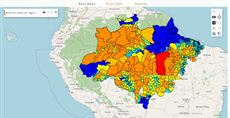
AMAZONES - Biodiversity
Display biodiversity relative importance across the Amazon Forest, this analysis is part of http://amazones.info/. See https://csr.ufmg.br/amazones/biodiversity/.
Reference: the parameters used here
Generated from the platform source. Every entry, searchable, is in the API reference; the raw data is api.json. Open an entry for its description, parameters and example; # links to it.
legendhtml · legend of the calculated map
LegendHtml7 entriesWritten in a layer's descriptionHtml as {{legendhtml|parameter=value|...}}
Usage: '{{legendhtml}}'
autoWidth
Boolean= true# Set true (default) to let the legend panel take the width of its container; set false to give it a fixed width.
autoWidthSet true (default) to let the legend panel take the width of its container; set false to give it a fixed width.
|autoWidth=false|width=250|filterLayers
Array.<Number>= null# Defines an array of indexes of layers to be included in map legend (from 0 to quantity of layers).
filterLayersDefines an array of indexes of layers to be included in map legend (from 0 to quantity of layers). If not defined, all layer legends are shown by default. Otherwise, only the listed indexes are included.
Ex: A composed layer with three maps: name: "CSR:estados,CSR:roads,CSR:municipalities", If 'filterLayers=[0,1]' is defined in the layer object only the legends of 'CSR:estatdos' and 'CSR:roads' are shown.
|filterLayers = [1,2]|id
String# Defines the id of the legend panel component (Ext.getCmp(id)), e.g. to show()/hide() it or to find the legend entries inside it.
idDefines the id of the legend panel component (Ext.getCmp(id)), e.g. to show()/hide() it or to find the legend entries inside it. Generated when omitted. Other GeoExt.WMSLegend/Ext.Panel configs (cls, style, hidden, useScaleParameter, autoWidth...) are passed through.
|id=main_legend|legendId
String= null# Defines the legend container id.
legendIdDefines the legend container id. You can use this id to toggle each legend filter individually.
|legendId=WIDGET_OBJECT_ID|preventClick
Boolean= false# Defines if the user can filter the maps categories by clicking on the legend.
preventClickDefines if the user can filter the maps categories by clicking on the legend. Set it true to ignore the legend click, false otherwise.
|preventClick = true|reverseLegend
Boolean= false# Defines if it should sort the legend on the decreasing order.
reverseLegendDefines if it should sort the legend on the decreasing order. Set it true to use the decreasing order, false otherwise.
|reverseLegend = true|useScaleParameter
Boolean= false# Set true to request a new legend image from the server whenever the map scale changes (GeoServer SCALE parameter), for styles that depend on the scale.
useScaleParameterSet true to request a new legend image from the server whenever the map scale changes (GeoServer SCALE parameter), for styles that depend on the scale. Off by default: the legend is generated once and reused, which is faster and keeps the click-to-filter behaviour stable.
|useScaleParameter=true|loadcsv · load a CSV table (input)
LoadCsv14 entriesWritten in a layer's descriptionHtml as {{loadcsv|parameter=value|...}}
columnNameToInd
function(columnName) : Number# Get the index of a column with the 'columnName' name.
columnNameToIndGet the index of a column with the 'columnName' name.
- columnName String
- Column name to search for.
Returns When it exists returns the column index, otherwise -1.
columnNamesToIndexes
function(columnNames) : Array.<Number># Resolves column names to column indexes: every string entry is looked up in the header (-1 when absent) and every numeric entry is kept as it is.
columnNamesToIndexesResolves column names to column indexes: every string entry is looked up in the header (-1 when absent) and every numeric entry is kept as it is. A single value is accepted in place of the array. This is what getLines/createIndexes do with their columns argument.
- columnNames Array.<(String|Number)>|String|Number
- Column names and/or indexes.
Returns The column indexes, in the same order.
inputs.id["fire_csv"].columnNamesToIndexes(["Year", 2]); // e.g. [1, 2]cors
Boolean= false# Downloads the CSV through the Mappia CORS proxy; use it for servers that do not send CORS headers.
corsDownloads the CSV through the Mappia CORS proxy; use it for servers that do not send CORS headers.
|cors=true|createIndexes
function(columns)# Create indexes for faster search.
createIndexesCreate indexes for faster search.
PS: Indexes are used to faster results on "getLines" calls, apply only when all [columns] are indexes.
- columns Array
- (Optional) Array of indexes/names of the filtered columns.
{...
    beforeCalc: function(inputs) {
        inputs.id['CSV_WIDGET_EXAMPLE_ID'].createIndexes(['Key', 'Year']);
        alert(inputs.id['CSV_WIDGET_EXAMPLE_ID'].getLines(['Key','Year'], [100, 2020]).length);
    }
}
getColunsInd
function() : Array.<String># Returns a copy of the header row — the column names, in order — so query code can discover columns instead of hard-coding indexes.
getColunsIndReturns a copy of the header row — the column names, in order — so query code can discover columns instead of hard-coding indexes. The name is a historical typo of getColumnsInd, kept for compatibility (the platform and many queries call it by this spelling; there is no correctly spelled alias).
Returns Copy of the header row.
var headers = inputs.id["fire_csv"].getColunsInd(); // ["Municipality", "Year", "Fires"]
var iFires = headers.indexOf("Fires");
getLineCount
function() : Number# Number of data lines in the table (the header line is not counted).
getLineCountNumber of data lines in the table (the header line is not counted).
Returns How many data lines the CSV has.
var csv = inputs.id["fire_csv"];
for (var i = 0; i < csv.getLineCount(); i++) total += parseFloat(csv.getValue(2, i));
getLines
function(columns, values, includeHeader) : Array.<Array.<String>># Returns the lines (arrays of cell strings) whose cells in columns equal the corresponding entries of values.
getLinesReturns the lines (arrays of cell strings) whose cells in columns equal the corresponding entries of values. Columns may be given by index or by header name; to filter on several columns give one value per column, e.g. getLines([1, "Year"], ["Park A", 2024]). Values are compared as strings (the CSV is always text). Called with no arguments it returns every data line (header skipped) — a common idiom. When all filtered columns were indexed with createIndexes the lookup uses the index instead of scanning every line.
- columns Array.<(String|Number)>
- Indexes and/or names of the columns to filter on.
- values Array
- One value per entry of
columns. - includeHeader Boolean
- True to also return the header line when it matches (only in the scanning path, i.e. without indexes).
Returns The matching lines; all data lines when no filter is given.
var csv = inputs.id["fire_csv"];
var rows2024 = csv.getLines(["Year"], [2024]);      // by header name
var rowsParkA = csv.getLines([0, "Year"], ["Park A", 2024]); // two columns
var allRows = csv.getLines();                         // every data line
getValue
function(column, line, includeHeader) : String# Get a value by the matrix index and column.
getValueGet a value by the matrix index and column.
- column Number
- Column index (First index is 0).
- line Number
- Line index (First index is 0).
- includeHeader boolean
- True to include the header line in the matrix index, False to ignore.
Returns Get the cell value.
id
String# Defines the id of the input; it is the key used to read the table in inputs.id[ID] (required, the tool renders nothing visible).
idDefines the id of the input; it is the key used to read the table in inputs.id[ID] (required, the tool renders nothing visible).
|id=emissions_csv|removeEmptyLines
boolean= false# Ignore the empty lines, removing them from the parsed CSV.
removeEmptyLinesIgnore the empty lines, removing them from the parsed CSV. True to remove the empty lines from the CSV.
setValue
function(column, line, value)# Change a cell value by its cell index.
setValueChange a cell value by its cell index.
- column Numeric
- Column index.
- line Numeric
- Line index to change (ignore the header information when it exists).
- value *
- New value to replace the older value.
trim
Boolean= false# Requests that cell values be trimmed of surrounding whitespace.
trimRequests that cell values be trimmed of surrounding whitespace. The flag is accepted and forwarded to the CSV parser, but the current parser ignores it (cells are stored as written, quotes removed), so trim values yourself when needed. Kept for compatibility with existing queries.
|trim=true|url
String# Defines the URL of the CSV file to download (required).
urlDefines the URL of the CSV file to download (required). Relative URLs are resolved against the Mappia host, so backend endpoints such as /wmtp/calc/... work; escape = inside query strings as \=. The layer waits for the download before calculating.
|url=/theme/app/data/emissoesco2.csv||url=/wmtp/calc/areacategorical/?layers\=CSR:estados&styles\=1|value
ExtjsUtils.CSV.CsvTable# Value stored in inputs.id[ID]: an ExtjsUtils.CSV.CsvTable wrapping the parsed file (first row = header).
valueValue stored in inputs.id[ID]: an ExtjsUtils.CSV.CsvTable wrapping the parsed file (first row = header). Read it with the CsvTable methods listed in this group (getLines, getValue, columnNameToInd, createIndexes, getLineCount...). It is undefined until the download finishes: the layer waits for the resource and recalculates on its waitend event, so beforeCalc/expression can rely on it being loaded.
{{loadcsv|id=emissions_csv|url=/theme/app/data/emissoesco2.csv|removeEmptyLines=true}}beforeCalc: function(inputs) {
var csv = inputs.id['emissions_csv']; // columns: percentage, carbon_loss
var rows = csv.getLines(0, '25'); // rows whose first column equals 25
}slider · number or range (input)
Slider17 entriesWritten in a layer's descriptionHtml as {{slider|parameter=value|...}}
backgroundColors
Array.<String># Array of colors of background slider values, to define background slider color based in slider value.
backgroundColorsArray of colors of background slider values, to define background slider color based in slider value. The values are defined from most to minimum with two properties each:
- color: {String} CSS color definition for the current interval. i.e. 'red','black','#FF0000', '#000000'.
- startValue: {Numeric} If defined define the initial value which above will apply this color, otherwise use theminimum slider value as default.
Ex.:
backgroundColors: [
{
// Define background color to red when slider has value above 75.
color: "red",
startValue: 75
},
{
// Define background color starting from value 0.
// That results two intervals, from 0 to 75 as blue, and from 76 to 100 as red.
color: "blue",
startValue: 0
}
]
cls
String# Extra CSS class(es) added to the slider element (appended to the default clickable).
clsExtra CSS class(es) added to the slider element (appended to the default clickable).
|cls=my_slider|disabled
Boolean= false# Set true to render the slider disabled (Ext disabled); enable it later with Ext.getCmp(id).enable().
disabledSet true to render the slider disabled (Ext disabled); enable it later with Ext.getCmp(id).enable().
|disabled=true|fieldLabel
String# Defines the label shown at the left of the slider (Ext fieldLabel).
fieldLabelDefines the label shown at the left of the slider (Ext fieldLabel).
|fieldLabel=Deforestation (%)|getValue
function() : Number# Returns the current value of a single-thumb slider.
getValueReturns the current value of a single-thumb slider. Call it on the component (Ext.getCmp(id) or a getid= reference), not on inputs.id[ID], which already holds the plain value.
Returns The current slider value.
var v = Ext.getCmp('deforestation_slider').getValue();getValues
function() : Array.<Number># Returns the value of every thumb; use it for range sliders created with values=[lo, hi].
getValuesReturns the value of every thumb; use it for range sliders created with values=[lo, hi].
Returns One value per thumb, in thumb order.
var range = Ext.getCmp('interval_slider').getValues(); // [lo, hi]gradient
Boolean= false# Set true to blend the backgroundColors into a continuous gradient along the filled part of the slider (each colour fading into the next from its startValue).
gradientSet true to blend the backgroundColors into a continuous gradient along the filled part of the slider (each colour fading into the next from its startValue). With the default false each interval is a solid colour, with a short blend only around the thumb. Has no effect without backgroundColors.
|backgroundColors=[{color: "green", startValue: 0}, {color: "red", startValue: 50}]|gradient=true|hideLabel
Boolean= false# Set true to hide the label and the space reserved for it (Ext hideLabel).
hideLabelSet true to hide the label and the space reserved for it (Ext hideLabel).
|hideLabel=true|id
String# Defines the id to identify the object.
idDefines the id to identify the object.
|id=example_slider|increment
Number# Defines the step of each increment or decrement in the actual value of the slider when being dragged.
incrementDefines the step of each increment or decrement in the actual value of the slider when being dragged.
|increment = 10|maxValue
Number# Defines the maximum value of the slider.
maxValueDefines the maximum value of the slider.
|maxValue = 100|minValue
Number# Defines the minimum value of the slider.
minValueDefines the minimum value of the slider.
|minValue = 0|setValue
function(value, animate)# Sets the slider value from code.
setValueSets the slider value from code. Firing the change event (the default) also updates inputs.id[ID] and recalculates the layer. For a range slider pass the thumb index first: setValue(index, value).
- value Number
- New value (clamped to
minValue/maxValue). - animate Boolean
- Set false to move the thumb without animation.
Ext.getCmp('deforestation_slider').setValue(20);thumbStyle
String= null# Defines extra CSS class(es) added to the slider thumb (the draggable handle), to restyle it.
thumbStyleDefines extra CSS class(es) added to the slider thumb (the draggable handle), to restyle it.
|thumbStyle=x-slider-thumb-cut|value
Number# Defines the initial value of the slider (default 100).
valueDefines the initial value of the slider (default 100).
At runtime the same value is what inputs.id[ID] (and inputs[i]) holds in beforeCalc/expression: a number, or an array [lower, upper] when the values range form is used. The layer recalculates on the slider change event (thumb released or value set from code).
|value = 100|beforeCalc: function(inputs) {
var threshold = inputs.id['deforestation_slider']; // number
}values
Array.<Number># Defines the slider interval limits.
valuesDefines the slider interval limits. If defined, the slider will be displayed as a range slider. It's return at the 'inputs' parameter will be a array of two values.
|values = [0, 250]||beforeCalc: function(inputs) {
let lowerValue = inputs[0][0]; // The value of the left drag
let upperValue = inputs[0][1]; // The value of the right drag
}|width
Number# Defines the slider width in pixels.
widthDefines the slider width in pixels. Any other Ext.slider.SingleSlider config (cls, fieldLabel, hideLabel, disabled, style, keyIncrement...) is also passed through unchanged.
|width=200|Calculated layers: methods (this.)
LayerInternal1 entrychangeLayers
function(newConfigs, force)method# Replaces an internal layer at a given index.
changeLayersWritten as this.changeLayers
Replaces an internal layer at a given index. PS: It's highly recommended to pass multiple configurations in an array, instead of calling this function multiple times in the same callback.
- newConfigs Array|Object
- One or more layers configurations with a property 'index' indicating the replacing layer. Each config object must contain at least the following properties: [{name: 'MAP_FULL_NAME', styles: 'MAP_STYLE', index: 'MAP_INDEX_TO_CHANGE'}, ... ]
- force Boolean
- Force redraw even if no change is done when the layer is the same.
{
     name: "CSR:rodovias,CSR:municipios",
     otherNames: "CSR:roads",
     beforeCalc: function(layerVals, inputVals) {
         this.changeLayers([{name: 'CSR:roads', styles: fMapName + "_1", index: 0}]);
     }
  }
label · text
Label6 entriesWritten in a layer's descriptionHtml as {{label|parameter=value|...}}
Usage: {{label|}}
cls
String# Extra CSS class(es) added to the <label> element.
clsExtra CSS class(es) added to the <label> element.
{{label|cls=slider_label|text=0%}}forId
String# Defines the id of the form field the label is for (rendered as the for attribute of the <label>), so clicking the label focuses that field.
forIdDefines the id of the form field the label is for (rendered as the for attribute of the <label>), so clicking the label focuses that field.
{{label|text=Price (US$)|forId=soy_value}}{{textfield|id=soy_value|isnumeric}}html
String# Defines the content of the label as raw HTML (not escaped).
htmlDefines the content of the label as raw HTML (not escaped). Everything after html= up to the next | is the value, so it may contain = characters. text wins when both are given.
{{label|cls=slider_label|html=0% <b>...</b> 100%|id=scale_label}}id
String# Defines the id of the label component (Ext.getCmp(id)), needed to change its text from code or to reference it with getid= in another tag.
idDefines the id of the label component (Ext.getCmp(id)), needed to change its text from code or to reference it with getid= in another tag. Generated when omitted.
{{label|id=deforestation_label|text=20%}}style
String# Inline CSS applied to the <label> element.
styleInline CSS applied to the <label> element. Any other Ext.form.Label/Ext.Component config (hidden, width...) is passed through unchanged.
{{label|text=Total|style=font-weight: bold; color: #336699;}}text
String# Defines the text of the label.
textDefines the text of the label. It is HTML-escaped, so use html when markup is needed. Update it later with Ext.getCmp(id).setText(text) (typically from an on_change= listener of a slider or textfield through getid=).
{{label|id=deforestation_label|text=Deforestation: 20%}}Highcharts · charts
Highcharts1 entryUsage: (Highcharts.chart(DOM_ID, {});)
chart
function(renderTo, options) : Object# Highcharts is loaded by the calculator and editor pages, so a query can call Highcharts.chart(...) without loading anything: put a container in the layer's descriptionHtml and create the chart …
chartWritten as Highcharts.chart
Highcharts is loaded by the calculator and editor pages, so a query can call Highcharts.chart(...) without loading anything: put a container in the layer's descriptionHtml and create the chart once the panel exists - in onInputsReady, in beforeCalc or in a widget handler - then update it as results arrive instead of recreating it. ExtjsUtils.HIGHCHART.getById(id) gives the chart back from the container's id, which is what makes the update possible from another callback.
The bundled build covers the standard chart types plus highcharts-more. Extra modules are loaded on demand with AsyncLoader.loadScriptOnce (see the Sankey entry).
- renderTo String
- Id of the container element declared in
descriptionHtml. - options Object
- The Highcharts configuration object.
Returns The chart instance.
descriptionHtml: '<div id="emissions_chart" style="height:220px"></div>',
functions: {
    drawChart: function (values) {
        var chart = ExtjsUtils.HIGHCHART.getById('emissions_chart');
        if (chart) { chart.series[0].setData(values); return; }
        Highcharts.chart('emissions_chart', {
            chart: { type: 'column' },
            title: { text: 'Emissions by year' },
            xAxis: { categories: ['2020', '2021', '2022'] },
            series: [{ name: 'Mt', data: values }]
        });
    }
}
Markup rules for every widget
MarkupSyntax1 entryFunction-valued parameters (handler, runOnClick, runOnHover, onSelect, ...) are resolved in this order: a key of the layer 'functions' object, then a global with that name (setQueryGlobalProperties), then the text itself evaluated as a function (a body, or a full 'function(){...}' expression).
getid
Object# getid=ID gives access to an element created EARLIER in the same description (by any tag with that id).
getidgetid=ID gives access to an element created EARLIER in the same description (by any tag with that id). At the top level (|getid=slider1|) the element is stored in the tool config under getid; the common use is to attach a listener to it with getid=ID|getid=on_<event>=... (see on_event), or the nested param=getid=ID to hand the element to a parameter (scope=getid=btn). Order matters: the referenced tag must appear before the one using getid.
{{slider|id=perc_slider|value=20}}{{label|id=perc_label|text=20%|getid=perc_slider|getid=on_change=Ext.getCmp('perc_label').setText(this.getValue() + '%')}}Layer callbacks: functions you write
LayersFunctions1 entryexpression
function= nullcallback# This function is executed for every pixel in the map.
expressionThis function is executed for every pixel in the map. It can be used to process the information of all maps in the Layer to create a new one. This function is called regularly to update the map.
- layerVals Array.<LayerValues>
- Is an array that has the value associated with the current pixel for each map defined in the 'name' property. The values order is the same as the one in ‘name’. For example, if in the 'name' property we have 'name: CSR:geologia,CSR:altimetria' the layerVals[0] has the value for the 'CSR:geologia' map and the layerVals[1] has the value for the 'CSR:altimetria'.
- inputs Array
- The value of each input defined in the descriptionHtml. The order of the values is the same as the inputs (i.e. the first input in the descriptionHtml is inputs[0], the second is inputs[1] and so on).
Returns Value of each processed pixel.
[
  {
     title: 'Example of expression function',
     color: '#FFA500',
     elements: [
        {
           title: 'This Layer is the result of the calculation of two maps',
           name: 'CSR:geologia,CSR:altimetria',
           source: 'calculate',
           legendTitle: 'All geologys above 800m',
           visibility: true,
           expression: function(layerVals, inputs) {
              let geologyValue = layerVals[0];
              let altitudeValue = layerVals[1];

              // Hide all values lower than 800
              if (altitudeValue < 800) {
                 return undefined;
              }

              return geologyValue;
           },
        },
     ],
  },
]
QUERY · setup calls and the running query
QUERY1 entryrunOnceLayerVisible
function(layer, callback)helper# Runs callback once the given layer becomes visible.
runOnceLayerVisibleWritten as ExtjsUtils.QUERY.runOnceLayerVisible
Runs callback once the given layer becomes visible. If the layer is already visible the callback runs immediately; otherwise it waits for the layer's first visibilitychanged event and then unregisters itself. The callback is invoked with the layer as this. Typically used inside a layer's onLoad/runNow code to defer work (charts, legends) until the user actually turns the layer on.
- layer OpenLayers.Layer
- Layer whose visibility is awaited.
- callback function
- Function called once with the layer as
this.
ExtjsUtils.QUERY.runOnceLayerVisible(ExtjsUtils.LAYER.getLayerByName("CSR:estados"), function() {
  console.log("Layer is now visible:", this.name);
});